Referrer blocking
Referrer blocking restricts access to your stream based on the HTTP Referer header sent by the viewer's browser. This allows you to control which websites are allowed to embed and play your content.
When enabled, the platform checks the Referer header of each playback request against a list of allowed domains. Requests originating from websites that are not on the list are rejected, preventing third parties from embedding your stream on their pages without permission.
Use cases
- Embed protection — ensure your stream can only be played on your own website or approved partner sites.
- Content piracy prevention — block unauthorized websites from hotlinking your stream.
- Partner control — allow specific resellers or affiliates to embed the stream while blocking everyone else.
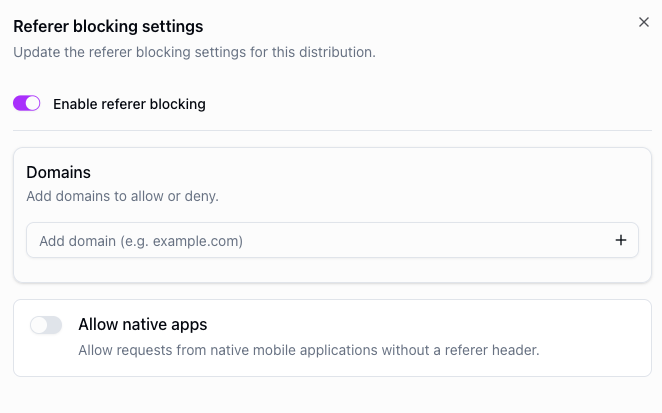
Referrer blocking can be configured via the API or the dashboard on a per-distribution basis.
Matching rules
The platform compares the host in the Referer header with each entry in the list of allowed domains. A request passes referrer blocking if its host matches at least one entry.
- Exact domains: an entry such as
example.commatches only that exact host, including the port.example.comdoes not matchwww.example.comorexample.com:8443. Ports are only accepted withlocalhost. - Local development: to test playback locally, add
localhostwith the port of your development server, such aslocalhost:3000.localhostwithout a port only matches a page served on the default port, such ashttp://localhost/. IP addresses such as127.0.0.1are not accepted. - Wildcards: an entry such as
*.example.commatches exactly one subdomain level of letters, digits and hyphens, such asa.example.comorwww.example.com. It does not matchexample.comitself or deeper subdomains such asa.b.example.com. Addexample.comas a separate entry to also allow the bare domain. A wildcard over a shared suffix such as*.co.ukallows every site directly under it. - Wildcard placement:
*is only allowed on its own at the start of an entry, followed by a domain such asexample.com. Entries such as*,*.com,a.*.example.comand*example.comare rejected. - Case: matching is case-insensitive, so
Example.comandexample.comare equivalent. - Native apps: requests without a
Refererheader, such as those from native mobile or TV apps, are only allowed when Allow native apps (allowNativeAppsin the API) is enabled. Browsers also omit the header when the embedding page's Referrer-Policy isno-referrerorsame-origin, so such pages are treated like native apps. The default policy of browsers sends the page's origin, which is all referrer blocking needs.
The Referer header is set by the viewer's browser or app, so referrer blocking deters other websites from embedding your stream, but it cannot stop a determined viewer. With Allow native apps enabled, any page that omits the header gets through. To restrict who can watch, combine it with token-based security.
API example
You can also configure referrer blocking via the API using the security.refererBlocking object when creating or updating a distribution.
POST https://api.theo.live/v2/channels/{channelId}/distributions
{
  "name": "my-distribution",
  "security": {
    "refererBlocking": {
      "enabled": true,
      "allowedDomains": ["example.com", "*.example.com", "partner.com"],
      "allowNativeApps": true
    }
  }
}