Mapping components in a chromeless UI on iOS and tvOS
A chromeless UI is made up of native controls and displays that must reflect player state and call the appropriate OptiView Player APIs. This guide maps common components to the APIs and supporting guides used to implement them.
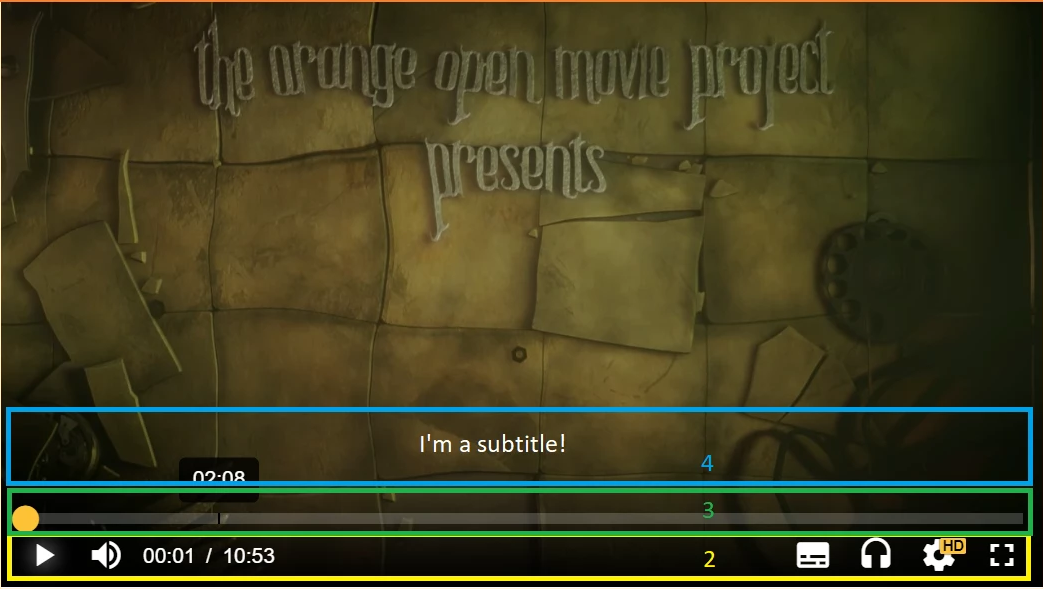
Play and pause
Show the appropriate control for the current state, as described in tracking player states. Call play() or pause() when the viewer selects it.
Mute and volume
Use the Player's muted property for mute controls. Apple platforms delegate volume-level changes to hardware controls, so the application should not provide an independent software volume slider.
Current time and duration
Use requestCurrentTime() and setCurrentTime() for the playback position. Use duration for duration.
For live streams, duration is Infinity. Use currentProgramDateTime when the interface needs an absolute program time.
Scrub bar and buffered ranges
Only seek within the ranges exposed by seekable. Update the scrubber in response to TIME_UPDATE, and represent downloaded portions using the Player's buffered ranges.
Display a loading state between seeking and seek completion when appropriate.
Audio, subtitle, and quality selection
Use the platform guides to build track selectors:
- Detect audio tracks
- Enable and disable audio tracks
- Detect text tracks
- Enable and disable text tracks
- Detect video-track qualities
- Select a video-track quality
Fullscreen and picture-in-picture
Use presentationMode to switch between inline and fullscreen modes. Keep custom controls within the Player view hierarchy so they remain visible during presentation changes. Use fullscreenOrientationCoupling when fullscreen should follow device orientation.
You can also implement presentation handling independently when the application needs more control. Picture-in-picture availability and behavior depend on the target Apple platform; see the picture-in-picture guide.
Casting
Use the Chromecast guide and AirPlay guide to detect availability and start or stop casting sessions.
Subtitle and advertisement overlays
You can use the SDK's subtitle rendering or detect active text-track cues and render them yourself.
For advertising controls such as countdowns, skip buttons, and scrub-bar markers, subscribe to the relevant ad events and update your interface from their callbacks.