Token-based security
Token-based security restricts access to your stream by requiring a valid JWT (JSON Web Token) on every playback request. This ensures that only authenticated viewers — those who have received a token from your backend — can access the stream.
How it works
When token security is enabled on a distribution, the CDN validates the JWT on each request. The token is signed with a shared secret (HS256/HS512) or a public/private key pair (RS256/RS512) that you provide when enabling the feature.
The token can be provided in one of two ways:
-
As an
Authorizationheader with a Bearer token:Authorization: Bearer <JWT> -
As a
tokenquery parameter:?token=<JWT>
The token payload must include:
exp— expiration time in epoch format. The token is rejected after this time.nbf(optional) — "not before" time in epoch format. The token is rejected before this time.
Additionally, the following standard optional claims are supported:
| Claim | Type | Description |
|---|---|---|
sub | string | Subject. If present, a SHA-256 hash of this value is used as the viewer identity. |
iss | string | Issuer. Identifies the system that created the token. |
Requests without a valid token are rejected with an HTTP 403 response.
Disabling token security makes the token optional, but it does not make the CDN ignore it. Any JWT still included in a request — via the Authorization header or the token query parameter — is validated for well-formedness and expiry. In particular, an expired token is rejected with an HTTP 403, even though the same request without a token would have been allowed. After disabling token security, make sure your players stop attaching (potentially stale) tokens.
Custom claims
The optiview claim
The JWT token supports a custom optiview claim that enables fine-grained access control. When present, the claim restricts token usage based on channel, geography, or device type.
| Property | Type | Description |
|---|---|---|
ch | string[] | Channel ID(s). If present, the token can exclusively be used for a channel in this list. |
geo | object | Geographic restrictions (country, region, DMA), combined into a single allow-list. See Geo restrictions. |
hw | string[] | Device type(s). If present, the token can exclusively be used by a device type in this list. Possible values: "desktop", "mobile", "tv". If the viewer's device type cannot be determined, this restriction is skipped. |
tid | string | Tracking ID. A group identifier string used to correlate viewers. |
cvd | string | Custom viewer data. Arbitrary string attached to the session, e.g. an individual identifier to uniquely identify a viewer. |
cc | string[] | Deprecated — use geo.cc instead. Country code(s), evaluated as part of the geo restrictions. |
rgn | string[] | Deprecated — use geo.rgn instead. Region code(s), evaluated as part of the geo restrictions. |
dma | number[] | Deprecated — use geo.dma instead. DMA code(s), evaluated as part of the geo restrictions. |
All properties are optional. When a property is omitted, no restriction is applied for that dimension. Every property that is present must be satisfied: a token restricted to a channel and a device type only works for that channel on that device type.
Geo restrictions
The geo object groups the geographic restrictions:
| Property | Type | Description |
|---|---|---|
cc | string[] | Country code(s) in ISO 3166-1 alpha-2 format (e.g. "US", "BE"). |
rgn | string[] | Region code(s) using the subdivision codes defined in ISO 3166-2, only supported for the United States and Canada (e.g. "US-CA", "US-NY"). |
dma | number[] | DMA (Designated Market Area) code(s), only supported for the United States and Canada (e.g. 501, 803). |
Together, the properties of geo form a single allow-list with OR semantics: the request is allowed when the viewer's country, region, or DMA code matches any of the listed values, and denied only when none of them do. An omitted property simply contributes no matches. For example:
"geo": {
  "cc": ["CA", "GB"],
  "rgn": ["US-AK", "US-AL"]
}
allows viewers in Canada, in Great Britain, and in the US states of Alaska and Alabama; viewers anywhere else — including all other US states — are denied. To restrict playback to specific US states, list those states in rgn and do not list "US" in cc.
If the viewer's region or DMA code cannot be determined, those values simply don't match; the request is denied unless another geo property matches.
The top-level cc, rgn and dma properties are deprecated in favor of the geo object. They keep working, but are now evaluated with the same OR semantics as the properties of a geo object — previously each was an independent restriction that all had to be satisfied. When a geo object is present, the top-level cc/rgn/dma properties are ignored entirely, so do not combine both. New integrations should use geo.
Device type mapping
The hw device types are derived from the viewer's User-Agent header:
| Detected device | Mapped type |
|---|---|
| Desktop / Media player | desktop |
| Smart Phone / Tablet | mobile |
| Smart TV / Game console | tv |
Example payload:
{
  "sub": "user-12345",
  "iat": 1516239022,
  "exp": 1672531200,
  "optiview": {
    "ch": ["channel_1", "channel_2"],
    "geo": {
      "cc": ["CA", "GB"],
      "rgn": ["US-AK", "US-AL"]
    },
    "hw": ["mobile", "tv"],
    "tid": "group-abc",
    "cvd": "viewer-98765"
  }
}
Configuration
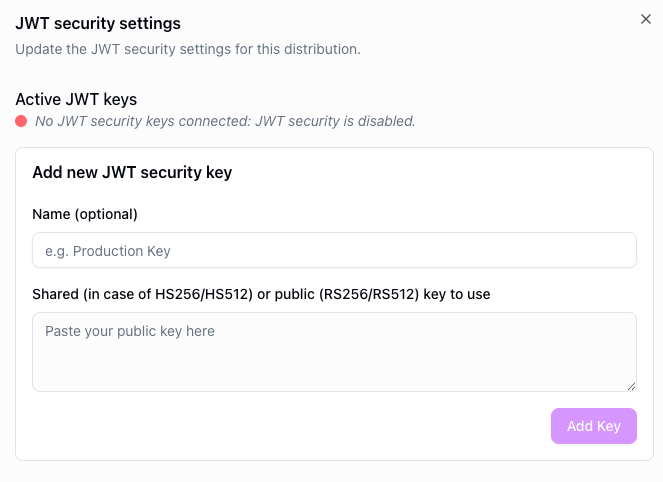
To enable token-based security, navigate to your distribution's security settings and enable the token security toggle. Provide the shared secret or public key used to verify tokens.
Supported signing algorithms
| Algorithm family | Key type | Description |
|---|---|---|
| HS256 / HS512 | HMAC (symmetric) | Signed with a shared secret. |
| RS256 / RS512 | RSA (asymmetric) | Signed with a public/private key pair. |
Player configuration
The player needs to be configured to pass the token with each request. Refer to the platform-specific guides: