Dolby OptiView Ads Introduction
OptiView Ads is an ad insertion service for LIVE content (VOD support coming soon), utilizing Server-Guided Ad Insertion (SGAI) as well as Server-Side Ad Insertion (SSAI). On these pages, you'll learn how to get started with OptiView Ads, model your live streams, schedule ad breaks, and configure the OptiView Ads SDK — the recommended integration approach.
By logically redistributing responsibilities in the advertisement workflow, OptiView Ads:
- Creates a seamless viewer experience across platforms.
- Simplifies the workflow by reducing complexity, which results in easier implementation and lower operational risk.
- Introduces innovative ad formats, creating more diverse and less intrusive ad opportunities.
- Maximizes workflow efficiency by reducing prefetching and over-allocation of inventory.
- Enables more relevant ads through a high degree of personalization.
OptiView Ads models each live stream as a channel. A channel monitors one or more origins, detects or schedules breaks, and can use reusable templates for consistent ad experiences. It generates a Break Manifest for the OptiView Ads SDK to poll and render.
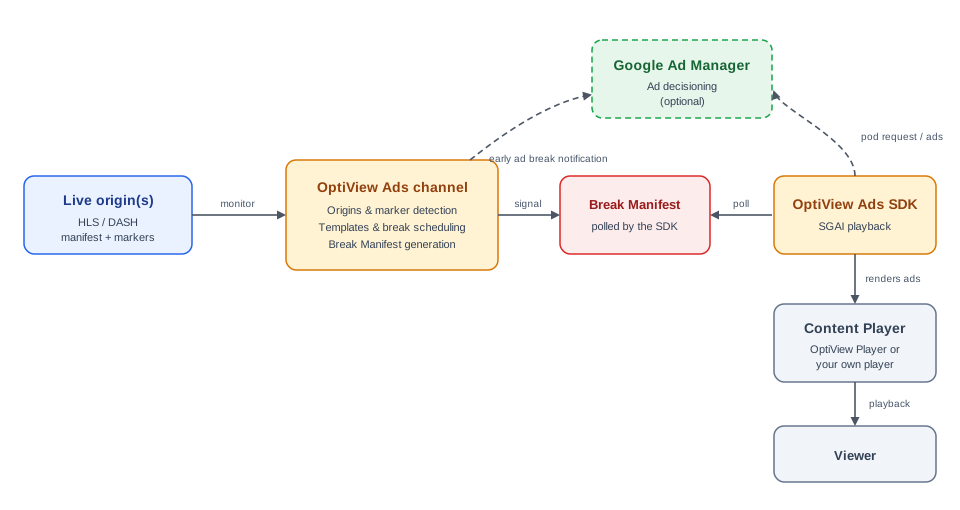
OptiView Ads supports both Dynamic Ad Replacement (DAR) — replacing ad breaks that are already present in your stream, detected through markers — and Dynamic Ad Insertion (DAI) — inserting new ad breaks that you schedule yourself.
OptiView Ads provides integrations with different ad servers for ad decisioning, transcoding, and serving, where Google Ad Manager is one of them.
For an end-to-end walkthrough, see Getting started with OptiView Ads. For the channel model, origins, breaks, and templates, see the Channels concept.
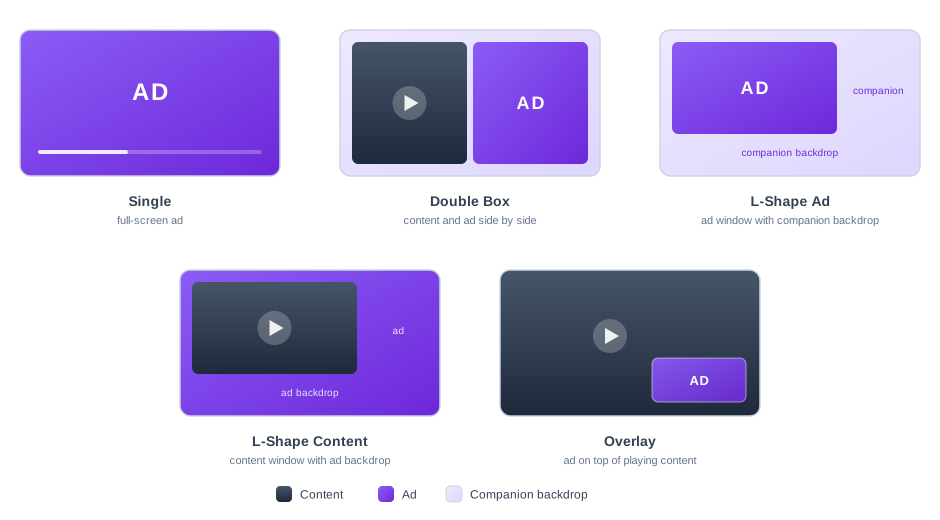
OptiView Ads enables innovative ad formats through the OptiView Ads SDK, providing new ways to monetize content in a less intrusive manner. The out-of-the-box layouts include:
- Single: Replaces the content with a full-screen advertisement.
- Double Box: Allows content to continue playing side-by-side with an advertisement and its companion background.
- L-Shape Ad: Plays the advertisement in the main window alongside a companion backdrop.
- L-Shape Content: Keeps the content playing in a scaled window alongside an ad backdrop.
- Overlay: Renders a non-linear advertisement on top of the content, which keeps playing.
Besides mid-roll breaks on the live timeline, breaks can also be triggered by player events: pre-roll (when playback starts), pause (while the viewer is paused), and post-roll (when playback ends) — each with an optional delay.
Getting Started
Set up your first stream with OptiView Ads!
Player integration
Connect OptiView Ads to a player.
Core concepts
Understand the resources that power OptiView Ads.
Integrations
Configure integrations for server-guided and server-side ad insertion.
How-to guides
Learn how to integrate OptiView Ads with your setup
API references
Discover all functions of OptiView Ads.