How to build a chromeless UI on Roku
Building a chromeless UI means building a brand-new video player UI from scratch. You achieve this by implementing your own custom UI components, and by associating those components with the appropriate THEOplayer API. The screenshot below visualizes such a chromeless UI -- albeit not the most pretty one.
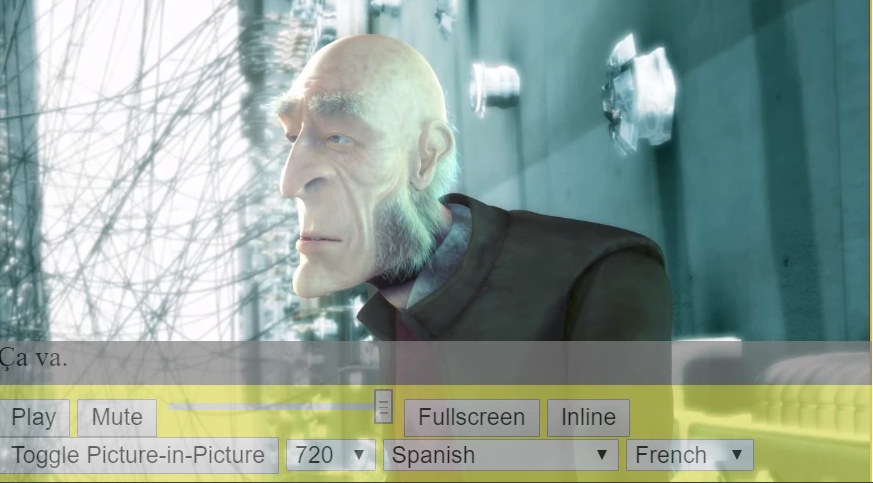
A chromeless UI gives you complete control over your full UI and UX, but it also means that you are responsible for implementing your full UI and UX. Achieving this feat requires you to have an adequate grasp on the video player architecture and its underlying API.
The goal of this guide is to advance your understanding on how to connect the dots between custom components and the THEOplayer API. For example, this guide will explain to which THEOplayer APIs you could map your custom play button.
This section will give you an overview on how custom controls can be integrated with THEOplayer API and also a brief introduction to BrightScript and SceneGraph. We will create play, pause, stop buttons, add audio and text tracks management menu and create a simple timeline.
Display chromeless player
To display the video in chromeless THEOplayer we have to take a few steps:
Include and add the instance of THEOplayer.
<THEOsdk:THEOplayer id="TestPlayer" controls="false"/>
Set the "controls" attribute to "false" to hide all default controls.
sub Init()
    m.player = m.top.findNode("TestPlayer")
    m.player.configuration = {
      "license": "<YOUR_LICENSE_STRING>"
    }
    ' we can go chromeless both via XML or Brightscript'
    ' m.player.controls = false
end sub
To set the player source, you can create the following function and then just call it inside the "init" function.
sub setSource()
    sourceDescription = {
        "sources": [
            {
                "src": "http://cdn.theoplayer.com/video/star_wars_episode_vii-the_force_awakens_official_comic-con_2015_reel_(2015)/index.m3u8",
                "type": "application/x-mpegURL"
            }
        ]
    }
    m.player.source = sourceDescription
end sub
To make sure that the player will be displayed in a proper position you can set a destination rectangle. In our example we will display the video in a rectangle (1600x800) positioned in the middle of the screen using the "setDestinationRectangle" THEOplayer method.
sub setupPlayerPosition()
    uiRes = m.top.getScene().currentDesignResolution
    m.uiRes = uiRes
    playerRect = {
        width: 1600,
        height: 800,
        x: (m.uiRes.width - 1600) / 2,
        y: (m.uiRes.height - 800) / 2
    }
    m.player.callFunc("setDestinationRectangle", playerRect)
end sub
When all is set up, all we have to do is to play the video using the "play" method.
m.player.callFunc("play")
Notice: The "play" method call is mandatory, otherwise the video playback won’t start and users won’t be able to use remote controls.
Below you can see the whole working example. The BrightScript code in this snippet is added inside the component xml file, but you can easily extract the logic part to separate ".brs" file by using "script" tag with a specified "uri" field.
<?xml version="1.0" encoding="utf-8" ?>
<component name="TestScene" extends="Scene">
    <interface>

    </interface>

    <script type = "text/brightscript" >

        <![CDATA[

        sub Init()
            m.player = m.top.findNode("TestPlayer")
            m.player.configuration = {
              "license": "<YOUR_LICENSE_STRING>"
            }
            ' we can go chromeless both via XML or Brightscript'
            ' m.player.controls = false

            m.player.callFunc("setMaxVideoResolution", 1920, 1080)
            setupPlayerPosition()
            setSource()
            m.top.setFocus(true)
            m.player.callFunc("play")
        end sub

        sub setSource()
            sourceDescription = {
                "sources": [
                    {
                        "src": "http://cdn.theoplayer.com/video/star_wars_episode_vii-the_force_awakens_official_comic-con_2015_reel_(2015)/index.m3u8",
                        "type": "application/x-mpegURL"
                    }
                ]
            }
            m.player.source = sourceDescription
        end sub

        sub setupPlayerPosition()
            uiRes = m.top.getScene().currentDesignResolution
            m.uiRes = uiRes
            playerRect = {
                width: 1600,
                height: 800,
                x: (m.uiRes.width - 1600) / 2,
                y: (m.uiRes.height - 800) / 2
            }
            m.player.callFunc("setDestinationRectangle", playerRect)
        end sub

        ]]>

    </script>

    <children>
	    <THEOsdk:THEOplayer id="TestPlayer" controls="false"/>
    </children>
</component>
Control bar Play, Pause, Stop buttons
To create a control bar with play, pause and stop buttons, generally we would need to create custom UI elements (buttons) and call the api methods when they are played. To accomplish that we have to take the following steps:
Let's start with creating the UI elements which are simply xml elements. We will add three buttons (play, pause and stop), along with timeline bar.
<Group id="playerOverlay">
	<Group id="GroupOptions">
		<Rectangle id="OptionsBackground" color="0x000000FF" height="47" width="10" opacity="0.5"/>
		<Rectangle id="TimelineBackground" height="3" width="0" opacity="0.3"/>
		<Rectangle id="TimelineProgress" height="3" width="0" color="0xFFC713FF"/>

		<ButtonGroup id="ButtonGroupOptions" layoutDirection="horiz">
			<Button id="ButtonPlay" iconUri="" focusBitmapUri="pkg:/images/focusBG.png" focusedIconUri="" maxWidth="115" minWidth="115" height="95" opacity="0.9" scale="[0.5,0.5]">
				<Poster width="75" height="65" id="playIcon" uri="pkg:/images/play.png" translation="[20,15]" opacity="0.9"/>
			</Button>
			<Button id="ButtonPause" iconUri="" focusBitmapUri="pkg:/images/focusBG.png" focusedIconUri="" maxWidth="115" minWidth="115" height="95" opacity="0.9" scale="[0.5,0.5]">
				<Poster width="75" height="65" id="pauseIcon" uri="pkg:/images/pause.png" translation="[20,15]" opacity="0.9"/>
			</Button>
			<Button id="ButtonStop" iconUri="" focusBitmapUri="pkg:/images/focusBG.png" focusedIconUri="" maxWidth="115" minWidth="115" height="95" opacity="0.9" scale="[0.5,0.5]">
				<Poster id="stopIcon" uri="pkg:/images/stop.png" width="75" height="65" translation="[20,15]" opacity="0.9"/>
			</Button>
		</ButtonGroup>
	</Group>
</Group>
Next step would be adding callback on buttons press. To do so, we will use roku native observe mechanism.
sub Init()
	m.player = m.top.findNode("TestPlayer")
	m.player.configuration = {
      "license": "<YOUR_LICENSE_STRING>"
    }
	m.buttonPlay = m.top.findNode("ButtonPlay")
	m.buttonPause = m.top.findNode("ButtonPause")
	m.buttonStop = m.top.findNode("ButtonStop")

	setupPlayerPosition()
	setupControlsPosition()
	setSource()

	m.buttonPlay.setFocus(true)

	m.buttonPlay.observeField("buttonSelected", "OnEventPlay")
	m.buttonPause.observeField("buttonSelected", "OnEventPause")
	m.buttonStop.observeField("buttonSelected", "OnEventStop")

end sub

sub OnEventPlay()

end sub

sub OnEventPause()

end sub

sub OnEventStop()

end sub
The next step would be calling the THEOplayer api methods inside our callback. To do so, we will modify the callbacks:
sub OnEventPlay()
	if m.player.source = Invalid
		setSource()
	end if
	m.player.callFunc("play")
end sub

sub OnEventPause()
	m.player.callFunc("pause")
end sub

sub OnEventStop()
	m.player.source = Invalid
end sub
Last thing left to do is to make the timeline work. We will add an event listener to an event "timeUpdate". This listener will allow us to react to every time update, so we can draw the current progress in playing video.
<?xml version="1.0" encoding="utf-8" ?>
<component name="TestScene" extends="Scene">
    <interface>

        <function name="callbackOnEventPlayerTimeupdate"/>

    </interface>

    <script type = "text/brightscript" >

        <![CDATA[

        sub Init()
            m.player = m.top.findNode("TestPlayer")
            m.player.configuration = {
              "license": "<YOUR_LICENSE_STRING>"
            }
            m.buttonPlay = m.top.findNode("ButtonPlay")
            m.buttonPause = m.top.findNode("ButtonPause")
            m.buttonStop = m.top.findNode("ButtonStop")

            m.player.callFunc("setMaxVideoResolution", 1920, 1080)
            setupPlayerPosition()
            setupControlsPosition()

            setSource()
            m.buttonPlay.setFocus(true)

            m.buttonPlay.observeField("buttonSelected", "OnEventPlay")
            m.buttonPause.observeField("buttonSelected", "OnEventPause")
            m.buttonStop.observeField("buttonSelected", "OnEventStop")

            m.player.listener = m.top
            m.player.callFunc("addEventListener", m.player.Event.c, "callbackOnEventPlayerTimeupdate")
        end sub

        sub setSource()
            sourceDescription = {
                "sources": [
                    {
                        "src": "http://cdn.theoplayer.com/video/star_wars_episode_vii-the_force_awakens_official_comic-con_2015_reel_(2015)/index.m3u8",
                        "type": "hls"
                    }
                ]
            }
            m.player.source = sourceDescription
        end sub

        sub setupPlayerPosition()
            uiRes = m.top.getScene().currentDesignResolution
            m.uiRes = uiRes
            playerRect = {
                width: 1600,
                height: 800,
                x: (m.uiRes.width - 1600) / 2,
                y: (m.uiRes.height - 800) / 2
            }
            m.player.callFunc("setDestinationRectangle", playerRect)
        end sub

        sub setupControlsPosition()
            buttons = [m.buttonPlay, m.buttonPause, m.buttonStop]
            buttonsWidth = 0

            for each button in buttons
                ' get rid of focus footprint on the buttons
                button.removeChildIndex(1)

                ' -20 because of buttons ovelaping and scale
                buttonsWidth += button.minWidth - 20
            end for

            uiRes = m.top.getScene().currentDesignResolution
            playerRect = m.player.boundingRect()
            playerBottomX = playerRect.width + playerRect.x
            playerBottomY = playerRect.height + playerRect.y
            m.groupOptions = m.top.findNode("GroupOptions")
            m.buttonGroupOptions = m.top.findNode("ButtonGroupOptions")
            m.groupOptionsVisible = true
            buttonGroupOptionsRect = m.buttonGroupOptions.boundingRect()
            centerY = playerRect.y + playerRect.height - buttonGroupOptionsRect.height
            centerX = playerRect.x
            m.groupOptions.translation = [centerX, centerY]
            centerX = (playerRect.width - buttonsWidth / 2) / 2
            m.buttonGroupOptions.translation = [centerX, 3]

            m.optionsBackground = m.top.findNode("OptionsBackground")
            m.optionsBackground.width = playerRect.width
            m.timelineBackground = m.top.findNode("TimelineBackground")
            m.timelineBackground.width = playerRect.width

            m.timelineProgress = m.top.findNode("TimelineProgress")
            m.timelineProgress.width = 1
        end sub

        sub callbackOnEventPlayerTimeupdate(eventData)
            'update movie timeline bar
            if m.player.duration > 0 and m.player.currentTime < m.player.duration
                rect = m.player.boundingRect()
                m.timelineProgress.width = rect.width * ( m.player.currentTime / m.player.duration )
            end if
        end sub

        sub OnEventPlay()
            if m.player.source = Invalid
                setSource()
            end if

            m.player.callFunc("play")
        end sub

        sub OnEventPause()
            m.player.callFunc("pause")
        end sub

        sub OnEventStop()
            m.player.source = Invalid
        end sub

        ]]>

    </script>

    <children>
	    <THEOsdk:THEOplayer id="TestPlayer" controls="false"/>

        <Group id="playerOverlay">
            <Group id="GroupOptions">
                <Rectangle id="OptionsBackground" color="0x000000FF" height="47" width="10" opacity="0.5"/>
                <Rectangle id="TimelineBackground" height="3" width="0" opacity="0.3"/>
                <Rectangle id="TimelineProgress" height="3" width="0" color="0xFFC713FF"/>

                <ButtonGroup id="ButtonGroupOptions" layoutDirection="horiz">
                    <Button id="ButtonPlay" iconUri="" focusBitmapUri="pkg:/images/focusBG.png" focusedIconUri="" maxWidth="115" minWidth="115" height="95" opacity="0.9" scale="[0.5,0.5]">

                        <Poster width="75" height="65" id="playIcon" uri="pkg:/images/play.png" translation="[20,15]" opacity="0.9"/>
                    </Button>
                    <Button id="ButtonPause" iconUri="" focusBitmapUri="pkg:/images/focusBG.png" focusedIconUri="" maxWidth="115" minWidth="115" height="95" opacity="0.9" scale="[0.5,0.5]">

                        <Poster width="75" height="65" id="pauseIcon" uri="pkg:/images/pause.png" translation="[20,15]" opacity="0.9"/>
                    </Button>
                    <Button id="ButtonStop" iconUri="" focusBitmapUri="pkg:/images/focusBG.png" focusedIconUri="" maxWidth="115" minWidth="115" height="95" opacity="0.9" scale="[0.5,0.5]">

                        <Poster id="stopIcon" uri="pkg:/images/stop.png" width="75" height="65" translation="[20,15]" opacity="0.9"/>
                    </Button>
                </ButtonGroup>

            </Group>
        </Group>
    </children>
</component>
Control bar Switch audio or text tracks
Now, let’s add an audio or text track management menu. In this portion, we will use a fresh SceneGraph component (RadioButtonList). We will use other callbacks, API methods and attributes. The main steps which we have to take to accomplish the desired outcome are:
Create an empty RadioButtonList component:
<RadioButtonList
    id="ButtonGroupCategoryFirst"
    opacity="1"
    focusBitmapUri="pkg:/images/focusBG.png"
    focusedColor="0xFFFFFFFF"
    color="0xFFFFFFFF"
    itemSize="[300,65]"
    translation="[0,65]">
</RadioButtonList>
Add the content to our list. To do so, we will observe audio tracks and assign the audio tracks list to a previously created radio button list.
sub onEventAudioTracksChanged()
    list = createObject("roSGNode","ContentNode")
    option = list.createChild("ContentNode")
    option.title = "default"
    option.description = "default"
    option.id = ""
    checkedItem = 0
    index = 1
    for each track in m.player.audioTracks
        option = list.createChild("ContentNode")
        option.title = track.label
        option.description = track.language
        option.id = track.id
        if track.enabled then
            checkedItem = index
        end if
        index +=1
    end for

    optionsCount = 0
    if Type(m.buttonGroupCategorySecond.content) <> "roInvalid" then
        optionsCount = m.buttonGroupCategorySecond.content.count()
    end if
    if list.count() <> optionsCount then
        m.buttonGroupCategorySecond.content = list
        m.buttonGroupCategorySecond.checkedItem = checkedItem
        setAudioMenuPosition()
    end if
end sub
The next step would be managing a focus of the remote.
function OnKeyEvent(key, press) as Boolean
    handled = false
    showOptions()
    if press
        if key = "options"
        else if m.player.visible = true and key = "back"
            ' Settings Menu opened
            if m.settingsOptions.visible = true
                hideSettings()
                handled = true
            ' category 1 Menu opened
            else if m.categoryFirstOptions.visible = true then
                hideCategoryFirst()
                handled = true
            ' category 2 Menu opened
            else if m.categorySecondOptions.visible = true then
                hideCategorySecond()
                handled = true
            else
                m.player.source = Invalid
            end if
        else if key = "up"
            if m.settingsOptions.visible = true and m.buttonCategoryFirst.hasFocus() = true
                hideSettings()
                handled = true
            ' category 1 Menu opened
            ' else if m.categoryFirstOptions.visible = true and m.buttonGroupCategoryFirst.hasFocus() = true then
            '     hideCategoryFirst()
            '     handled = true
            ' category 2 Menu opened
            else if m.categorySecondOptions.visible = true and m.categorySecondButtonFirst.hasFocus() = true then
                hideCategorySecond()
                handled = true
            end if
        end if
    end if

    return handled
end function
In order to allow the user to change audio tracks, we have to prepare a function which will change audio track.
sub setAudioTrack(label as String)
    audioTracks =  m.player.audioTracks
    for i =  audioTracks.count() - 1 to 0 step -1
        if audioTracks[i].label = label then
            audioTracks[i].enabled = true
        else
            audioTracks[i].enabled = false
        end if
    end for
    'required because roku deep-copied roAssociativeArray through fields (pass-by-value)
    'read more : <https://developer.roku.com/en-gb/docs/developer-program/performance-guide/optimization-techniques.md#OptimizationTechniques-DataFlow>
    m.player.audioTracks = audioTracks
end sub

sub OnEventCategorySecondSelectedItem()
    if m.player.instance <> Invalid
        itemIndex = m.buttonGroupCategorySecond.checkedItem
        item = m.buttonGroupCategorySecond.content.getChild(itemIndex)
        setAudioTrack(item.title)
    end if
end sub
To complete this functionality, we will add an observer to the radio button list and call the setAudioTrack function.
sub OnEventCategoryFirstSelectedItem()
    if m.player.instance <> Invalid
        itemIndex = m.buttonGroupCategoryFirst.checkedItem
        item = m.buttonGroupCategoryFirst.content.getChild(itemIndex)
        setCaptionsLanguage(item.description)
    end if
end sub
You can find the whole example below. This example contains two menus which allow users to manipulate audio and text tracks.
<?xml version="1.0" encoding="utf-8" ?>
<component name="TestScene" extends="Scene">
<interface>
<function name="callbackOnEventPlayerTimeupdate"/>
</interface>
<script type="text/brightscript">
<![CDATA[
sub Init()
SetupUI()
SetupObservers()
SetupEventListeners()
end sub
sub SetupUI()
m.buttonPlay = m.top.findNode("ButtonPlay")
m.buttonPause = m.top.findNode("ButtonPause")
m.buttonStop = m.top.findNode("ButtonStop")
m.buttonSettings = m.top.findNode("ButtonSettings")
m.categoryFirstHeaderBackground = m.top.findNode("CategoryFirstHeaderBackground")
m.settingsOptions = m.top.findNode("SettingsOptions")
m.buttonCategoryFirst = m.top.findNode("ButtonCategoryFirst")
m.buttonCategorySecond = m.top.findNode("ButtonCategorySecond")
m.categoryFirstButtonFirst = m.top.findNode("CategoryFirstButtonFirst")
m.categorySecondButtonFirst = m.top.findNode("CategorySecondButtonFirst")
m.player = m.top.findNode("TestPlayer")
m.player.configuration = {
"license": "<YOUR_LICENSE_STRING>"
}
SetupPlayerPosition()
SetControlsPosition()
setSource()
m.buttonPlay.setFocus(true)
end sub
sub SetupObservers()
m.player.observeField("audioTracks","onEventAudioTracksChanged")
m.player.observeField("textTracks","onEventTextTracksChanged")
m.buttonPlay.observeField("buttonSelected", "OnEventPlay")
m.buttonPause.observeField("buttonSelected", "OnEventPause")
m.buttonStop.observeField("buttonSelected", "OnEventStop")
m.buttonSettings.observeField("buttonSelected", "OnEventSettings")
m.buttonCategoryFirst.observeField("buttonSelected", "OnEventCategoryFirst")
m.buttonGroupCategoryFirst.observeField("itemFocused", "OnEventCategoryFirstFocusedItem")
m.buttonGroupCategoryFirst.observeField("checkedItem", "OnEventCategoryFirstSelectedItem")
m.buttonCategorySecond.observeField("buttonSelected", "OnEventCategorySecond")
m.buttonGroupCategorySecond.observeField("itemFocused", "OnEventCategorySecondFocusedItem")
m.buttonGroupCategorySecond.observeField("checkedItem", "OnEventCategorySecondSelectedItem")
end sub
sub SetupEventListeners()
m.player.listener = m.top
m.player.callFunc("addEventListener", m.player.Event.timeupdate, "callbackOnEventPlayerTimeupdate")
end sub
sub SetupPlayerPosition()
m.uiRes = m.top.getScene().currentDesignResolution
m.timelineProgress = m.top.findNode("TimelineProgress")
m.timelineProgress.width = 1
'm.player.callFunc("setMaxVideoResolution", m.uiRes.width, m.uiRes.height)
' center video'
'playerRect = {
'' width: m.uiRes.width,
'' height: m.uiRes.height,
'' x: 0,
'' y: 0
''}
'm.player.callFunc("setDestinationRectangle", playerRect)
end sub
sub SetControlsPosition()
buttons = [m.buttonPlay, m.buttonPause, m.buttonStop, m.buttonSettings]
buttonsWidth = 0
for each button in buttons
' get rid of focus footprint on the buttons
button.removeChildIndex(1)
' -20 because of buttons ovelaping and scale
buttonsWidth += button.minWidth - 20
end for
playerRect = m.player.boundingRect()
playerBottomX = playerRect.width + playerRect.x
playerBottomY = playerRect.height + playerRect.y
m.groupOptions = m.top.findNode("GroupOptions")
m.buttonGroupOptions = m.top.findNode("ButtonGroupOptions")
m.groupOptionsVisible = true
buttonGroupOptionsRect = m.buttonGroupOptions.boundingRect()
centerY = playerRect.y + playerRect.height - buttonGroupOptionsRect.height
centerX = playerRect.x
m.groupOptions.translation = [centerX, centerY]
centerX = (playerRect.width - buttonsWidth / 2) / 2
m.buttonGroupOptions.translation = [centerX, 3]
m.optionsBackground = m.top.findNode("OptionsBackground")
m.optionsBackground.width = playerRect.width
m.timelineBackground = m.top.findNode("TimelineBackground")
m.timelineBackground.width = playerRect.width
m.settingsOptions = m.top.findNode("SettingsOptions")
m.buttonGroupSettings = m.top.findNode("ButtonGroupSettings")
settingsRect = m.settingsOptions.boundingRect()
buttonGroupSettingsRect = m.buttonGroupSettings.boundingRect()
groupOptionsRect = m.groupOptions.boundingRect()
centerX = playerBottomX - buttonGroupSettingsRect.x - settingsRect.width - 20
centerY = playerBottomY - buttonGroupSettingsRect.y - settingsRect.height - 20
m.settingsOptions.translation = [centerX, centerY ]
m.categoryFirstOptions = m.top.findNode("CategoryFirstOptions")
m.categoryFirstBackground = m.top.findNode("CategoryFirstBackground")
m.buttonGroupCategoryFirst = m.top.findNode("ButtonGroupCategoryFirst")
SetClosedCaptionsMenuPosition()
m.categorySecondOptions = m.top.findNode("CategorySecondOptions")
m.categorySecondBackground = m.top.findNode("CategorySecondBackground")
m.buttonGroupCategorySecond = m.top.findNode("ButtonGroupCategorySecond")
SetAudioMenuPosition()
end sub
sub SetClosedCaptionsMenuPosition()
playerRect = m.player.boundingRect()
playerBottomX = playerRect.width + playerRect.x
playerBottomY = playerRect.height + playerRect.y
categoryFirstRect = m.categoryFirstOptions.boundingRect()
categoryFirstButtonGroupRect = m.buttonGroupCategoryFirst.boundingRect()
centerX = playerBottomX - categoryFirstButtonGroupRect.x - categoryFirstRect.width - 20
centerY = playerBottomY - categoryFirstButtonGroupRect.y - categoryFirstRect.height - m.categoryFirstHeaderBackground.height - 20
m.categoryFirstOptions.translation = [centerX, centerY]
m.categoryFirstBackground.height = categoryFirstRect.height + 30 ' added 30 because radio group shows separator
if playerRect.x = 0 or playerRect.y = 0 or playerRect.width = m.uiRes.width or playerRect.height = m.uiRes.height then
m.fullScreen = true
if m.player.textTracks.count() > 0
m.buttonCategoryFirst.textColor = "0xFFFFFFFF"
m.buttonCategoryFirst.focusedTextColor = "0xFFFFFFFF"
else
m.buttonCategoryFirst.textColor = "0x666666FF"
m.buttonCategoryFirst.focusedTextColor = "0x666666FF"
end if
else
m.fullScreen = false
m.buttonCategoryFirst.textColor = "0x666666FF"
m.buttonCategoryFirst.focusedTextColor = "0x666666FF"
end if
end sub
sub SetAudioMenuPosition()
playerRect = m.player.boundingRect()
playerBottomX = playerRect.width + playerRect.x
playerBottomY = playerRect.height + playerRect.y
categorySecondOptionsRect = m.categorySecondOptions.boundingRect()
categorySecondButtonGroupRect = m.buttonGroupCategorySecond.boundingRect()
centerX = playerBottomX - categorySecondButtonGroupRect.x - categorySecondOptionsRect.width - 20
centerY = playerBottomY - categorySecondButtonGroupRect.y - categorySecondOptionsRect.height - 20
m.categorySecondOptions.translation = [centerX, centerY]
m.categorySecondBackground.height = categorySecondOptionsRect.height
isNode = Type(m.buttonGroupCategorySecond.content) = "roSGNode"
if isNode then
m.buttonCategorySecond.textColor = "0xFFFFFFFF"
m.buttonCategorySecond.focusedTextColor = "0xFFFFFFFF"
else
m.buttonCategorySecond.textColor = "0x666666FF"
m.buttonCategorySecond.focusedTextColor = "0x666666FF"
end if
end sub
sub callbackOnEventPlayerTimeupdate(eventData)
? "Event <timeupdate>: "; eventData
'update movie timeline bar
if m.player.duration > 0 and m.player.currentTime < m.player.duration
rect = m.player.boundingRect()
m.timelineProgress.width = rect.width * ( m.player.currentTime / m.player.duration )
end if
end sub
sub setSource()
sourceDescription = {
"poster": ""
"sources": [
{
"src": "http://cdn.theoplayer.com/video/elephants-dream/playlist.m3u8",
"live": m.live,
"type": "application/x-mpegURL"
}
]
}
m.player.source = sourceDescription
end sub
sub OnEventPlay()
if m.player.source = Invalid
setSource()
end if
m.player.callFunc("play")
end sub
sub hideOptions()
if m.groupOptionsVisible = true
m.groupOptionsVisible = false
hideCategoryFirst()
hideCategorySecond()
hideSettings()
end if
end sub
sub showOptions()
if m.groupOptionsVisible = false
m.groupOptionsVisible = true
end if
end sub
sub showCategoryFirst()
hideSettings()
m.categoryFirstOptions.visible = true
m.buttonGroupCategoryFirst.setFocus(true)
end sub
sub hideCategoryFirst()
if m.categoryFirstOptions.visible = true
m.categoryFirstOptions.visible = false
showSettings()
end if
end sub
sub showCategorySecond()
hideSettings()
m.categoryFirstOptions.visible = true
m.categorySecondButtonFirst.setFocus(true)
end sub
sub hideCategorySecond()
if m.categorySecondOptions.visible = true
m.categorySecondOptions.visible = false
showSettings()
end if
end sub
sub showSettings()
m.settingsOptions.visible = true
m.buttonCategoryFirst.setFocus(true)
end sub
sub hideSettings()
if m.settingsOptions.visible = true
m.settingsOptions.visible = false
m.buttonSettings.setFocus(true)
end if
end sub
sub OnEventPause()
m.player.callFunc("pause")
end sub
sub OnEventStop()
m.player.source = Invalid
end sub
sub OnEventCategoryFirst()
isNode = Type(m.buttonGroupCategoryFirst.content) = "roSGNode"
if isNode and m.fullScreen
m.settingsOptions.visible = false
m.categoryFirstOptions.visible = true
m.buttonGroupCategoryFirst.setFocus(true)
end if
end sub
sub OnEventCategorySecond()
isNode = Type(m.buttonGroupCategorySecond.content) = "roSGNode"
if isNode
m.settingsOptions.visible = false
m.categorySecondOptions.visible = true
m.buttonGroupCategorySecond.setFocus(true)
end if
end sub
sub onEventAudioTracksChanged()
list = createObject("roSGNode","ContentNode")
option = list.createChild("ContentNode")
option.title = "default"
option.description = "default"
option.id = ""
checkedItem = 0
index = 1
for each track in m.player.audioTracks
option = list.createChild("ContentNode")
option.title = track.label
option.description = track.language
option.id = track.id
if track.enabled then
checkedItem = index
end if
index +=1
end for
optionsCount = 0
if Type(m.buttonGroupCategorySecond.content) <> "roInvalid" then
optionsCount = m.buttonGroupCategorySecond.content.count()
end if
if list.count() <> optionsCount then
m.buttonGroupCategorySecond.content = list
m.buttonGroupCategorySecond.checkedItem = checkedItem
setAudioMenuPosition()
end if
end sub
sub onEventTextTracksChanged()
list = createObject("roSGNode","ContentNode")
option = list.createChild("ContentNode")
option.title = "default"
option.description = "default"
option.id = ""
checkedItem = 0
index = 1
for each track in m.player.textTracks
if track.kind = "captions"
option = list.createChild("ContentNode")
option.title = track.label
option.description = track.language
option.id = track.id
if track.mode = "showing" then
checkedItem = index
end if
index +=1
end if
end for
optionsCount = 0
if Type(m.buttonGroupCategoryFirst.content) <> "roInvalid" then
optionsCount = m.buttonGroupCategoryFirst.content.count()
end if
if list.count() <> optionsCount then
m.buttonGroupCategoryFirst.content = list
m.buttonGroupCategoryFirst.checkedItem = checkedItem
setClosedCaptionsMenuPosition()
end if
end sub
sub OnEventSettings()
if m.settingsOptions.visible = false
m.settingsOptions.visible = true
m.buttonCategoryFirst.setFocus(true)
else
m.settingsOptions.visible = false
end if
end sub
sub OnEventCategoryFirstFocusedItem()
showOptions()
end sub
sub setCaptionsLanguage(language as String)
textTracks = m.player.textTracks
for i = textTracks.count() - 1 to 0 step -1
if textTracks[i].kind = "captions" and textTracks[i].language = language then
if m.fullScreen then
textTracks[i].mode = "showing"
else
textTracks[i].mode = "hidden"
end if
else
textTracks[i].mode = "disabled"
end if
end for
'assigment of new roAssociativeArray is required because roku deep-copied roAssociativeArray through fields (pass-by-value)
'read more : <https://developer.roku.com/en-gb/docs/developer-program/performance-guide/optimization-techniques.md#OptimizationTechniques-DataFlow>
m.player.textTracks = textTracks
end sub
sub OnEventCategoryFirstSelectedItem()
if m.player.instance <> Invalid
itemIndex = m.buttonGroupCategoryFirst.checkedItem
item = m.buttonGroupCategoryFirst.content.getChild(itemIndex)
setCaptionsLanguage(item.description)
end if
end sub
sub OnEventCategorySecondFocusedItem()
showOptions()
end sub
sub setAudioTrack(label as String)
audioTracks = m.player.audioTracks
for i = audioTracks.count() - 1 to 0 step -1
if audioTracks[i].label = label then
audioTracks[i].enabled = true
else
audioTracks[i].enabled = false
end if
end for
'required because roku deep-copied roAssociativeArray through fields (pass-by-value)
'read more : <https://developer.roku.com/en-gb/docs/developer-program/performance-guide/optimization-techniques.md#OptimizationTechniques-DataFlow>
m.player.audioTracks = audioTracks
end sub
sub OnEventCategorySecondSelectedItem()
if m.player.instance <> Invalid
itemIndex = m.buttonGroupCategorySecond.checkedItem
item = m.buttonGroupCategorySecond.content.getChild(itemIndex)
setAudioTrack(item.title)
end if
end sub
function OnKeyEvent(key, press) as Boolean
handled = false
showOptions()
if press
if key = "options"
else if m.player.visible = true and key = "back"
' Settings Menu opened
if m.settingsOptions.visible = true
hideSettings()
handled = true
' category 1 Menu opened
else if m.categoryFirstOptions.visible = true then
hideCategoryFirst()
handled = true
' category 2 Menu opened
else if m.categorySecondOptions.visible = true then
hideCategorySecond()
handled = true
else
m.player.source = Invalid
end if
else if key = "up"
if m.settingsOptions.visible = true and m.buttonCategoryFirst.hasFocus() = true
hideSettings()
handled = true
' category 1 Menu opened
' else if m.categoryFirstOptions.visible = true and m.buttonGroupCategoryFirst.hasFocus() = true then
' hideCategoryFirst()
' handled = true
' category 2 Menu opened
else if m.categorySecondOptions.visible = true and m.categorySecondButtonFirst.hasFocus() = true then
hideCategorySecond()
handled = true
end if
end if
end if
return handled
end function
]]>
</script>
<children>
<THEOsdk:THEOplayer id="TestPlayer" controls="false"/>
<Group id="playerOverlay">
<Group id="GroupOptions">
<Rectangle id="OptionsBackground" color="0x000000FF" height="47" width="10" opacity="0.5"/>
<Rectangle id="TimelineBackground" height="3" width="0" opacity="0.3"/>
<Rectangle id="TimelineProgress" height="3" width="0" color="0xFFC713FF"/>
<ButtonGroup id="ButtonGroupOptions" layoutDirection="horiz">
<Button id="ButtonPlay" iconUri="" focusBitmapUri="pkg:/images/focusBG.png" focusedIconUri="" maxWidth="115" minWidth="115" height="95" opacity="0.9" scale="[0.5,0.5]">
<Poster width="75" height="65" id="playIcon" uri="pkg:/images/play.png" translation="[20,15]" opacity="0.9"/>
</Button>
<Button id="ButtonPause" iconUri="" focusBitmapUri="pkg:/images/focusBG.png" focusedIconUri="" maxWidth="115" minWidth="115" height="95" opacity="0.9" scale="[0.5,0.5]">
<Poster width="75" height="65" id="pauseIcon" uri="pkg:/images/pause.png" translation="[20,15]" opacity="0.9"/>
</Button>
<Button id="ButtonStop" iconUri="" focusBitmapUri="pkg:/images/focusBG.png" focusedIconUri="" maxWidth="115" minWidth="115" height="95" opacity="0.9" scale="[0.5,0.5]">
<Poster id="stopIcon" uri="pkg:/images/stop.png" width="75" height="65" translation="[20,15]" opacity="0.9"/>
</Button>
<Button id="ButtonSettings" iconUri="" focusBitmapUri="pkg:/images/focusBG.png" focusedIconUri="" maxWidth="115" minWidth="115" height="95" opacity="0.9" scale="[0.5,0.5]">
<Poster id="settingsIcon" uri="pkg:/images/settings.png" width="75" height="65" translation="[20,15]" opacity="0.9"/>
</Button>
</ButtonGroup>
</Group>
<Group id="SettingsOptions" visible="false">
<Rectangle id="SettingsBackground" color="0x000000FF" width="500" height="215" translation="[-15,0]" opacity="0.5"/>
<Rectangle id="SettingsHeaderBackground" color="0xFFC713FF" width="500" height="65" translation="[-15,0]">
<Label text="Settings" height="65" width="470" horizAlign="center" vertAlign="center" font="font:SmallestBoldSystemFont"/>
</Rectangle>
<ButtonGroup id="ButtonGroupSettings" layoutDirection="vert" vertAlignment="top" translation="[0,65]" opacity="1">
<Button
id="ButtonCategoryFirst"
iconUri=""
focusedIconUri=""
focusBitmapUri="pkg:/images/focusBG.png"
maxWidth="470"
minWidth="470"
height="65"
opacity="0.9"
text="Captions"
focusedTextColor="0xFFFFFFFF"
textFont="font:SmallestBoldSystemFont"
focusedTextFont="font:SmallestBoldSystemFont"></Button>
<Button
id="ButtonCategorySecond"
iconUri=""
focusedIconUri=""
focusBitmapUri="pkg:/images/focusBG.png"
maxWidth="470"
minWidth="470"
height="65"
opacity="0.9"
text="Audio Tracks"
focusedTextColor="0xFFFFFFFF"
textFont="font:SmallestBoldSystemFont"
focusedTextFont="font:SmallestBoldSystemFont"></Button>
</ButtonGroup>
</Group>
<Group id="CategoryFirstOptions" visible="false">
<Rectangle id="CategoryFirstBackground" color="0x000000FF" width="300" height="0" opacity="0.5"/>
<Rectangle id="CategoryFirstHeaderBackground" color="0xFFC713FF" width="300" height="65">
<Label text="Captions" height="65" width="300" horizAlign="center" vertAlign="center" font="font:SmallestBoldSystemFont"/>
</Rectangle>
<RadioButtonList
id="ButtonGroupCategoryFirst"
opacity="1"
focusBitmapUri="pkg:/images/focusBG.png"
focusedColor="0xFFFFFFFF"
color="0xFFFFFFFF"
itemSize="[300,65]"
translation="[0,65]">
</RadioButtonList>
</Group>
<Group id="CategorySecondOptions" visible="false">
<Rectangle id="CategorySecondBackground" color="0x000000FF" width="300" height="0" opacity="0.5"/>
<Rectangle id="CategorySecondHeaderBackground" color="0xFFC713FF" width="300" height="65">
<Label text="Audio Tracks" height="65" width="300" vertAlign="center" horizAlign="center" font="font:SmallestBoldSystemFont"/>
</Rectangle>
<RadioButtonList
id="ButtonGroupCategorySecond"
opacity="1"
focusBitmapUri="pkg:/images/focusBG.png"
focusedColor="0xFFFFFFFF"
color="0xFFFFFFFF"
itemSize="[300,65]"
translation="[0,65]">
</RadioButtonList>
</Group>
</Group>
</children>
</component>
Sample code
The github project at https://github.com/THEOplayer/samples-roku-sdk/tree/master/basic-playback-app/components/ChromelessView provides a basic implementation of a chromeless UI on the Roku SDK.
UX enhancements
You can make your user-experience more appealing through various enhancements. For example, when the player is out of video data and is waiting for additional content you could show a 'loading' indication.
Below are some common UX enhancements to consider:
- Loading spinner: provide an indication when no video data is available.
- Poster: show a poster (thumbnail) before initial play-request, and when the video is complete.
- Auto next: when approaching the end, render a clickable overlay that allows the viewer to navigate to the next stream. Automatically play this stream when the current stream ends.
- Skip intro: render a clickable button to skip the (ongoing) intro.
- Ad countdown: overlay the remaining time of the ongoing ad break.
- Ad markers: indicate the position of ad breaks in the scrub bar.
Error handling
A UI should also be capable of handling errors and informing the viewer. Refer to our introduction on errors to further explore this topic.