Dolby OptiView Ads Introduction
OptiView Ads is the new name for THEOads as part of the OptiView product suite. During the transition, you may still see references to THEOads. OptiView Ads and THEOads refer to the same product.
OptiView Ads is an ad insertion service for LIVE content (VoD support coming soon), utilizing Server-Guided Ad Insertion (SGAI). On these pages, you'll learn how to get started with OptiView Ads, model your live streams, schedule ad breaks, and configure OptiView Player.
By logically redistributing responsibilities in the advertisement workflow, OptiView Ads:
- Creates a seamless viewer experience across platforms.
- Simplifies the workflow by reducing complexity, which results in easier implementation and lower operational risk.
- Introduces innovative ad formats, creating more diverse and less intrusive ad opportunities.
- Maximizes workflow efficiency by reducing prefetching and over-allocation of inventory.
- Enables more relevant ads through a high degree of personalization.
OptiView Ads models each live stream as a channel. A channel monitors one or more origins, detects or schedules breaks, and can use reusable templates for consistent ad experiences. It generates a Break Manifest for OptiView Player to poll and render.
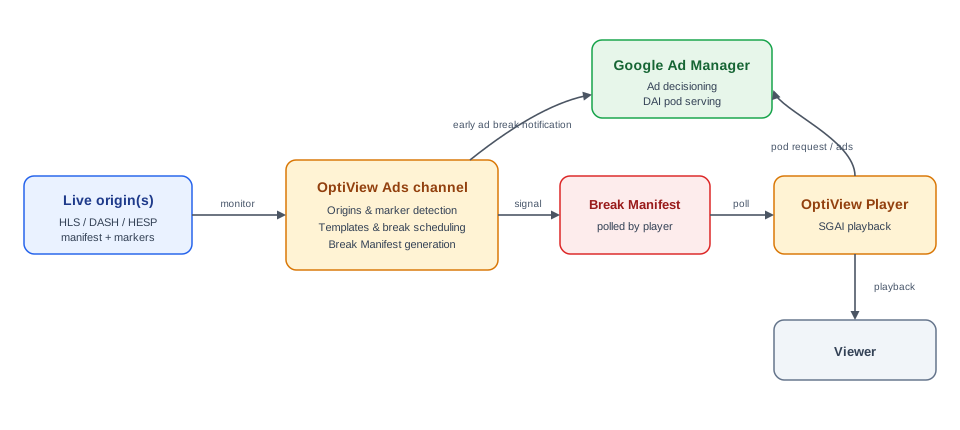
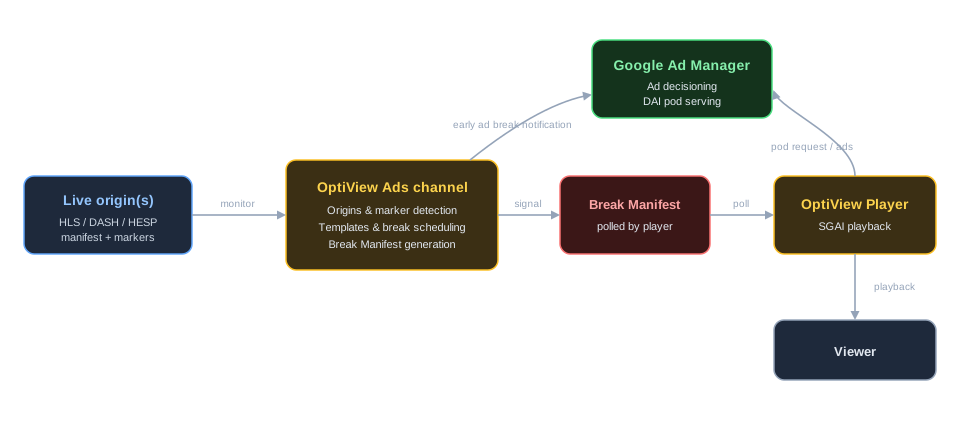
OptiView Ads is tightly integrated with Google Ad Manager for ad decisioning, transcoding, and serving, ensuring a streamlined process for ad delivery and management.
For an end-to-end walkthrough, see Getting started with OptiView Ads. For the channel model, origins, breaks, and templates, see the Channels concept.
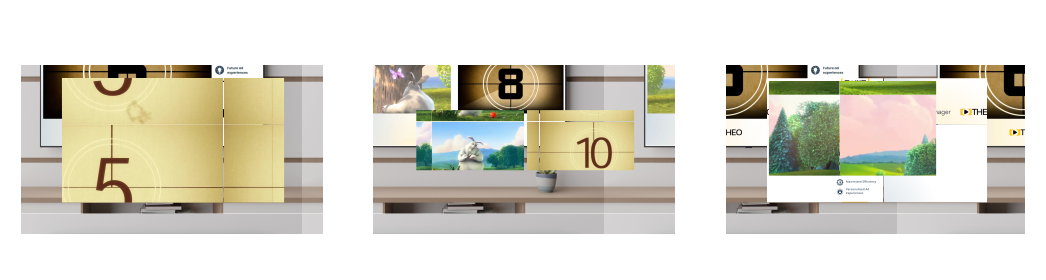
OptiView Ads enables innovative ad formats through OptiView Player, providing new ways to monetize content in a less intrusive manner. The out-of-the-box formats include, but are not limited to:
- Default Full Screen Ad Insertion: Replaces the content with an advertisement.
- Double Box: Allows content to continue playing side-by-side with an advertisement and its companion background.
- L-shape: Displays content or advertisements in a scaled window alongside a companion background.
Note: Every OptiView Player comes with the functionality to enable OptiView Ads by default. However, an OptiView Ads-enabled OptiView Player license is required to activate this functionality.
Getting Started
This guide walks through the end-to-end path to monetize a live stream with Server-Guided Ad Insertion (SGAI): create a channel, attach and enable an origin, define a reusable break template, schedule a break, and play it in OptiView Player. Every step is available in the OptiView Unified Dashboard and through the REST API.
Core concepts
Understand the resources that power OptiView Ads.
Vendors
Configure vendor integrations for server-guided and server-side ad insertion.
Player integration
Connect OptiView Ads to a player.
How-to guides
Learn how to integrate OptiView Ads with your setup
Limitations and known issues
This page lists the current limitations and known issues of OptiView Ads.
API references
Discover all functions of OptiView Ads.