Breaks
A break is the core monetization entity in OptiView Ads. It represents an ad opportunity scheduled on a channel and contains the timing, lifecycle state, playback controls, layout variants, and typed assets that a player or delivery service needs.
Breaks are scoped to an organization and created for a channel. API calls authenticate with an API key and secret using HTTP Basic authentication and identify the organization with the X-Org-ID header.
Dashboard path
In the OptiView Unified Dashboard, open Ads → Channels, open a channel, and select Breaks. The Breaks area is used to schedule, inspect, and delete breaks for the channel.
Break identity
The compound identity of a Break is:
orgId + channelId + id
id is optional when creating a Break. If omitted, the API generates an identifier. The identity is scoped by both the organization and channel, so the same id can exist on different channels or in different organizations.
| Field | Type | Description |
|---|---|---|
id | string | Break identifier. Auto-generated if omitted on create. |
orgId | string | Organization scope. Supplied by the authenticated X-Org-ID context. |
channelId | string | Parent channel identifier. |
originId | string, optional | Provenance for an automatically detected Break. Set internally by the detection worker and not client-settable. |
templateId | string, optional | Identifier of the Template used to create the Break, if any. |
eventId | string, optional | Identifier of the Event under which the Break was scheduled, if any. |
The Break also stores internal Google DAI fields such as podId, assetKey, networkCode, customAssetKey, and daiAssetKeys, plus the lifecycle status, optional errorMessage, timebase-specific start fields, denormalized indexes, and the raw data payload.
Stored fields
| Field | Type | Required/default behavior |
|---|---|---|
id | string | Required; generated when omitted on create. |
orgId | string | Required organization scope. |
channelId | string | Required channel scope. |
eventId | string, optional | Event association. |
templateId | string, optional | Template association retained after creation. |
podId | string, optional | Google DAI pod identifier after vendor-pod decisioning. |
status | enum | PREPARING, CUED, READY, SIGNALED, or ERROR. |
originId | string, optional | Internal provenance for an automatically detected Break. |
markerRuleId | string, optional | Marker rule associated with automatic detection. |
markerDetectionId | string, optional | Detection-history record associated with automatic detection. |
assetKey | string, optional | Google DAI asset key. |
networkCode | string, optional | Organization Google DAI network-code snapshot. |
customAssetKey | string, optional | Channel Google DAI custom-asset-key snapshot. |
daiAssetKeys | string array, optional | Deduplicated SSAI DAI asset-key snapshot. |
errorMessage | string, optional | Failure reason when status is ERROR. |
timebase | wallclock or pts | Required; copied from the channel. |
startWallclock | Date, optional | Wallclock start for wallclock channels. |
startPts | number, optional | Numeric PTS start for PTS channels. |
duration | number | Required duration in seconds. |
variantFormats | string array, optional | Denormalized variant-format index. |
assetTypes | string array, optional | Denormalized asset-type index. |
vendors | string array, optional | Denormalized vendor index. |
data | object | Required raw BreakData payload. |
createdAt | Date | Automatically managed creation timestamp. |
updatedAt | Date | Automatically managed modification timestamp. |
Related resources
| Resource | Relationship |
|---|---|
| Channels | Parent resource. The channel's timebase determines which start field a Break uses. |
| Events | Time windows that group related Breaks. |
| Templates | Reusable Break definitions merged into a new Break at creation time. |
| Origins | Manifest sources whose detected markers can create Breaks. |
| Marker rules and detection history | Rules and audit records associated with automatically detected Breaks. |
| Integrations | Channel-level delivery integrations, including SSAI DAI cue fan-out. |
Scheduling
Timebase-dependent starts
Every Break copies the timebase of its channel:
| Channel timebase | API start value | Stored field | Requirement |
|---|---|---|---|
wallclock | ISO 8601 datetime string | startWallclock | Optional. Omitting it creates a CUED no-start workflow. |
pts | Non-negative number | startPts | Required. |
The API request field is named start; the service maps it to startWallclock or startPts according to the channel timebase. A PTS channel rejects a missing or non-numeric start. A wallclock channel accepts an omitted start, but a supplied start must be a valid ISO datetime.
duration is required and is expressed in seconds. A scheduled Break cannot overlap another Break on the same channel. Wallclock overlap is evaluated using wallclock instants; PTS overlap is evaluated using PTS values.
The service also requires a scheduled start to be sufficiently ahead of the current effective playhead. GAM vendor pod Breaks must additionally clear the EABN decisioning margin.
Create a Break directly
Create a Break by supplying its payload and, when required, its start:
curl -X POST 'https://ads.example.com/api/v1/channels/sports-main/breaks' \
  -u "$ADS_API_KEY:$ADS_API_SECRET" \
  -H 'Content-Type: application/json' \
  -H 'X-Org-ID: org_123' \
  -d '{
    "id": "break-2026-001",
    "start": "2026-07-16T12:15:00.000Z",
    "duration": 120,
    "resumeOffset": 0,
    "controls": {
      "skipOffset": 30,
      "snapback": true
    },
    "variant": {
      "format": "single",
      "assets": [
        {
          "id": "asset-001",
          "type": "static",
          "mediaType": "video",
          "mimeType": "video/mp4",
          "uri": "https://cdn.example.com/ads/asset-001.m3u8"
        }
      ]
    }
  }'
Create from a Template
Supply templateId to use a Template as the base. At creation time, the service merges the Template's stored data and duration with the request overrides, validates the result, and snapshots the resolved payload into the new Break's data. Later Template edits do not change an existing Break.
Supported creation overrides are:
ideventIdstartdurationvariantassetParameters
curl -X POST 'https://ads.example.com/api/v1/channels/sports-main/breaks' \
  -u "$ADS_API_KEY:$ADS_API_SECRET" \
  -H 'Content-Type: application/json' \
  -H 'X-Org-ID: org_123' \
  -d '{
    "templateId": "template-sports-spot",
    "id": "break-from-template-001",
    "start": "2026-07-16T12:20:00.000Z",
    "eventId": "event-2026-final",
    "assetParameters": {
      "airingId": "airing-001"
    }
  }'
Create under an Event
An eventId must identify an Event belonging to the same organization and channel. For wallclock channels, the Break must satisfy all of these conditions:
start >= event.startDatestart <= event.endDatestart + duration <= event.endDate
PTS channels still require the Event to exist on the same organization and channel, but the service does not compare a numeric PTS start to the Event's wallclock window.
Scheduling constraints
The API rejects starts that are too close to, or behind, the effective playhead. It also rejects any overlap with an existing Break on the channel. These checks apply to direct and Template-based creation.
Lifecycle
The exact Break status values are:
PREPARING
CUED
READY
SIGNALED
ERROR
errorMessage contains the human-readable reason when a Break is moved to ERROR.
Initial status
| Break kind | Start supplied? | Initial status |
|---|---|---|
GAM vendor pod (vendor: "gam", vendorParameters.type: "pod") | Either | PREPARING |
| Non-vendor Break | Yes | READY |
| Non-vendor Break on a wallclock channel | No | CUED |

Status transitions and owners
| Transition | Owner | Behavior |
|---|---|---|
PREPARING → CUED | Worker / EABN | After Google DAI decisioning, a Break without a timebase-appropriate start becomes CUED. |
PREPARING → READY | Worker / EABN | After Google DAI decisioning, a Break with a timebase-appropriate start becomes READY. |
PREPARING → ERROR | Worker / health worker | A missed unsignaled Break is failed with Break passed its scheduling window before it could be signaled. |
CUED → READY | API punch | Punching assigns startWallclock and makes the Break eligible for delivery. |
READY → SIGNALED | Manifest service | The Break Manifest includes READY and SIGNALED Breaks, then changes returned READY Breaks to SIGNALED. |
READY → SIGNALED | Proxy | After injecting HLS cues, the proxy changes the injected READY Breaks to SIGNALED. The update is scoped to READY and is idempotent. |
The worker can also reset a superseded active Google Break from READY or SIGNALED back to PREPARING when it is still outside the decision margin.
Cue and punch workflow
Vendor pod Breaks can be prepared before their exact start is known:
- Create a GAM vendor pod Break without a start on a wallclock channel. It starts in
PREPARING. - The worker/EABN service pre-decides the Break with Google DAI.
- After decisioning, the Break receives a
podIdand becomesCUED. - Punch the Break when it should fire. Punching sets
startWallclockand changes the status toREADY.
Only wallclock channels support punch. A GAM CUED Break must have a podId from EABN decisioning before it can be punched. The application allows only one no-start Break in PREPARING or CUED per channel; creating another one fails.
curl -X POST 'https://ads.example.com/api/v1/channels/sports-main/breaks/gam-cued-001/punch' \
  -u "$ADS_API_KEY:$ADS_API_SECRET" \
  -H 'Content-Type: application/json' \
  -H 'X-Org-ID: org_123' \
  -d '{
    "start": "2026-07-16T12:25:00.000Z"
  }'
If the body is omitted, the punch uses the current time. A requested past time is clamped to now.
Break payload (data)
The stored data object has this shape:
type BreakData = {
  duration: number; // required, seconds, >= 0
  resumeOffset?: number; // seconds, >= 0
  controls?: {
    skipOffset?: number; // seconds, >= 0
    snapback?: boolean;
  };
  variant: BreakVariant | BreakVariant[]; // one object or a non-empty array
};
| Field | Type | Description |
|---|---|---|
duration | number | Required Break duration in seconds. |
resumeOffset | number, optional | Resume offset in seconds. |
controls.skipOffset | number, optional | Minimum elapsed time before skipping is allowed. |
controls.snapback | boolean, optional | Enables snapback behavior. |
variant | object or array | One layout variant, or a non-empty array of targeted variants. |
Layouts and variants
This is the canonical V2 layout and variant reference. Templates use the same payload model and should refer to this section rather than duplicate the layout definitions.
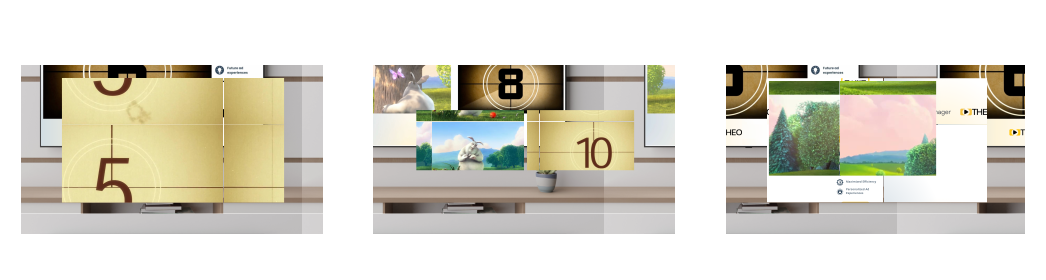
Asset model
Every asset has these common fields:
{
  id: string;
  mediaType: "video" | "image";
  mimeType?: string;
  duration?: number;
  interaction?: {
    clickThrough?: string;
  };
}
id is generated as a UUID when omitted. Asset type is one of:
type | Fields |
|---|---|
static | uri: a URL string or an array of { value, targeting? } objects. |
vast | uri: a URL string or an array of { value, targeting? } objects. |
vendor | vendor: "gam", vendorParameters, optional assetParameters, and uri. GAM vendor parameters require type: "pod". The default uri is "placeholder". |
For URI arrays, each entry can include optional device targeting:
{
  value: string;
  targeting?: {
    deviceType?: "desktop" | "tablet" | "mobile" | "tv";
  };
}
single

The single variant contains a non-empty plain assets array:
{
  format: "single";
  targeting?: { deviceType?: "desktop" | "tablet" | "mobile" | "tv" };
  assets: Asset[];
}
Use a full-screen creative. Optimize the asset size for the player and supply companion imagery separately when the player experience requires it.
double

The double variant contains a non-empty array in which every entry has a primary asset and a companion asset:
{
  format: "double";
  targeting?: { deviceType?: "desktop" | "tablet" | "mobile" | "tv" };
  assets: Array<Asset & { companion: Asset }>;
}
Use 16:9 companion imagery where possible. The double box is unsupported on many smart TVs; provide a single-format fallback for those devices.
lshape_ad

The lshape_ad variant uses the same companion-bearing asset shape as double:
{
  format: "lshape_ad";
  targeting?: { deviceType?: "desktop" | "tablet" | "mobile" | "tv" };
  assets: Array<Asset & { companion: Asset }>;
}
The ad occupies the smaller window and the companion asset supplies the remaining backdrop. Use 16:9 companion imagery and optimize image dimensions for the target player.
lshape_content

The lshape_content variant uses a non-empty plain asset array:
{
  format: "lshape_content";
  targeting?: { deviceType?: "desktop" | "tablet" | "mobile" | "tv" };
  assets: Asset[];
}
The live content occupies the smaller window and the remaining area is supplied by the layout's companion/backdrop treatment.
overlay

The overlay variant uses a non-empty plain asset array plus required position and size objects:
{
  format: "overlay";
  targeting?: { deviceType?: "desktop" | "tablet" | "mobile" | "tv" };
  assets: Asset[];
  position: {
    top?: number;
    bottom?: number;
    left?: number;
    right?: number;
  };
  size: {
    width: number;
    height: number;
  };
  opacity?: number;
}
position requires at least one of top or bottom and at least one of left or right. All position and size values are fractions from 0 through 1, not percentages. opacity, when supplied, is also a fraction from 0 through 1.
Multiple variants and device targeting
Set variant to an array when one Break contains multiple layouts for different devices. Each variant can have an optional targeting.deviceType value:
{
  "duration": 30,
  "variant": [
    {
      "format": "single",
      "targeting": {
        "deviceType": "mobile"
      },
      "assets": [
        {
          "type": "static",
          "mediaType": "video",
          "uri": "https://cdn.example.com/ads/mobile.m3u8"
        }
      ]
    },
    {
      "format": "single",
      "targeting": {
        "deviceType": "tv"
      },
      "assets": [
        {
          "type": "static",
          "mediaType": "video",
          "uri": "https://cdn.example.com/ads/tv.m3u8"
        }
      ]
    },
    {
      "format": "double",
      "targeting": {
        "deviceType": "desktop"
      },
      "assets": [
        {
          "type": "static",
          "mediaType": "video",
          "uri": "https://cdn.example.com/ads/desktop.m3u8",
          "companion": {
            "type": "static",
            "mediaType": "image",
            "uri": "https://cdn.example.com/ads/desktop-companion.jpg"
          }
        }
      ]
    },
    {
      "format": "double",
      "targeting": {
        "deviceType": "tablet"
      },
      "assets": [
        {
          "type": "static",
          "mediaType": "video",
          "uri": "https://cdn.example.com/ads/tablet.m3u8",
          "companion": {
            "type": "static",
            "mediaType": "image",
            "uri": "https://cdn.example.com/ads/tablet-companion.jpg"
          }
        }
      ]
    }
  ]
}
Delivery overview
Break Manifest polling
The Manifest Service returns READY and SIGNALED Breaks that remain within the channel's DVR window. It changes returned READY Breaks to SIGNALED and emits the timebase-specific start, duration, controls, resume offset, and variant data. Players poll the Manifest according to the channel's advertised idle and active polling intervals.
SSAI cue injection
For wallclock GAM pod Breaks on channels with an SSAI DAI integration, the Proxy injects HLS EXT-X-DATERANGE OUT and IN cues into the media playlist. After the cues are written, it changes the injected Breaks from READY to SIGNALED.
PREPARING, CUED, and ERROR Breaks are not delivered through either path.
API usage
All examples use the same organization-scoped Basic authentication as the Channels API.
Create directly
curl -X POST 'https://ads.example.com/api/v1/channels/sports-main/breaks' \
  -u "$ADS_API_KEY:$ADS_API_SECRET" \
  -H 'Content-Type: application/json' \
  -H 'X-Org-ID: org_123' \
  -d '{
    "id": "break-api-001",
    "start": "2026-07-16T12:30:00.000Z",
    "duration": 60,
    "controls": {
      "skipOffset": 10,
      "snapback": false
    },
    "variant": {
      "format": "single",
      "assets": [
        {
          "type": "vast",
          "mediaType": "video",
          "uri": "https://ads.example.com/vast/creative-001.xml"
        }
      ]
    }
  }'
Create from a Template
curl -X POST 'https://ads.example.com/api/v1/channels/sports-main/breaks' \
  -u "$ADS_API_KEY:$ADS_API_SECRET" \
  -H 'Content-Type: application/json' \
  -H 'X-Org-ID: org_123' \
  -d '{
    "templateId": "template-sports-spot",
    "start": "2026-07-16T12:31:00.000Z",
    "duration": 45
  }'
List Breaks
curl 'https://ads.example.com/api/v1/channels/sports-main/breaks?page=1&pageSize=20' \
  -u "$ADS_API_KEY:$ADS_API_SECRET" \
  -H 'X-Org-ID: org_123'
page defaults to 1; pageSize defaults to 20 and has a maximum of 100. Lists also accept the optional RSQL filter and sort parameters.
Filterable fields are:
wallclock, assetType, format, eventId, templateId, duration, status, originId
Sortable fields are:
wallclock, duration, status, createdAt
Filter by one status:
curl 'https://ads.example.com/api/v1/channels/sports-main/breaks?filter=status==READY' \
  -u "$ADS_API_KEY:$ADS_API_SECRET" \
  -H 'X-Org-ID: org_123'
Filter by either READY or SIGNALED:
curl 'https://ads.example.com/api/v1/channels/sports-main/breaks?filter=status=in=(READY,SIGNALED)' \
  -u "$ADS_API_KEY:$ADS_API_SECRET" \
  -H 'X-Org-ID: org_123'
The /active and /current variants are also available:
GET /api/v1/channels/{channelId}/breaks/active
GET /api/v1/channels/{channelId}/breaks/current
Get one Break
curl 'https://ads.example.com/api/v1/channels/sports-main/breaks/break-api-001' \
  -u "$ADS_API_KEY:$ADS_API_SECRET" \
  -H 'X-Org-ID: org_123'
Delete one Break
curl -X DELETE 'https://ads.example.com/api/v1/channels/sports-main/breaks/break-api-001' \
  -u "$ADS_API_KEY:$ADS_API_SECRET" \
  -H 'X-Org-ID: org_123'
Bulk delete Breaks
curl -X DELETE 'https://ads.example.com/api/v1/channels/sports-main/breaks' \
  -u "$ADS_API_KEY:$ADS_API_SECRET" \
  -H 'Content-Type: application/json' \
  -H 'X-Org-ID: org_123' \
  -d '{
    "ids": ["break-api-001", "break-api-002"]
  }'
Punch a CUED Break
curl -X POST 'https://ads.example.com/api/v1/channels/sports-main/breaks/gam-cued-001/punch' \
  -u "$ADS_API_KEY:$ADS_API_SECRET" \
  -H 'Content-Type: application/json' \
  -H 'X-Org-ID: org_123' \
  -d '{
    "start": "2026-07-16T12:35:00.000Z"
  }'
See also
- Channels — channel timebases, polling policy, origins, marker detection, and delivery integrations.
- Templates — reusable Break definitions and Template-based scheduling.
- Events — event windows and event-scoped Breaks.
- Marker Detection — automatic marker evaluation and Break provenance.
- Vendors and Google DAI — vendor pod decisioning and delivery.